
The PAM Academy · Module 3
Most privileged access management programmes do not fail because the vault was the wrong product. They fail because nobody designed the processes around it. Accounts get created faster than they get reviewed. People change jobs and keep everything they had before. Service accounts run for years with no owner, no rotation and no record of what breaks if you touch them. Emergency access is granted in a crisis and quietly never expires.
The symptoms are familiar. Leavers still appear in privileged groups weeks after their last day. Access reviews arrive as a spreadsheet nobody understands, so every line gets approved. A password rotation is scheduled, an application falls over, and the organisation decides rotation is too risky to repeat. Each of these is a process defect, not a technology defect, and no amount of licence spend fixes it.
This module covers the five processes that carry a PAM programme in day to day operation: the access lifecycle for joiners, movers and leavers; access reviews that produce real decisions; just-in-time and least privilege; service account governance; password and secret rotation; and exception and emergency access. Each section gives the design steps, the controls that make them enforceable, and the measures that show whether they are actually working.
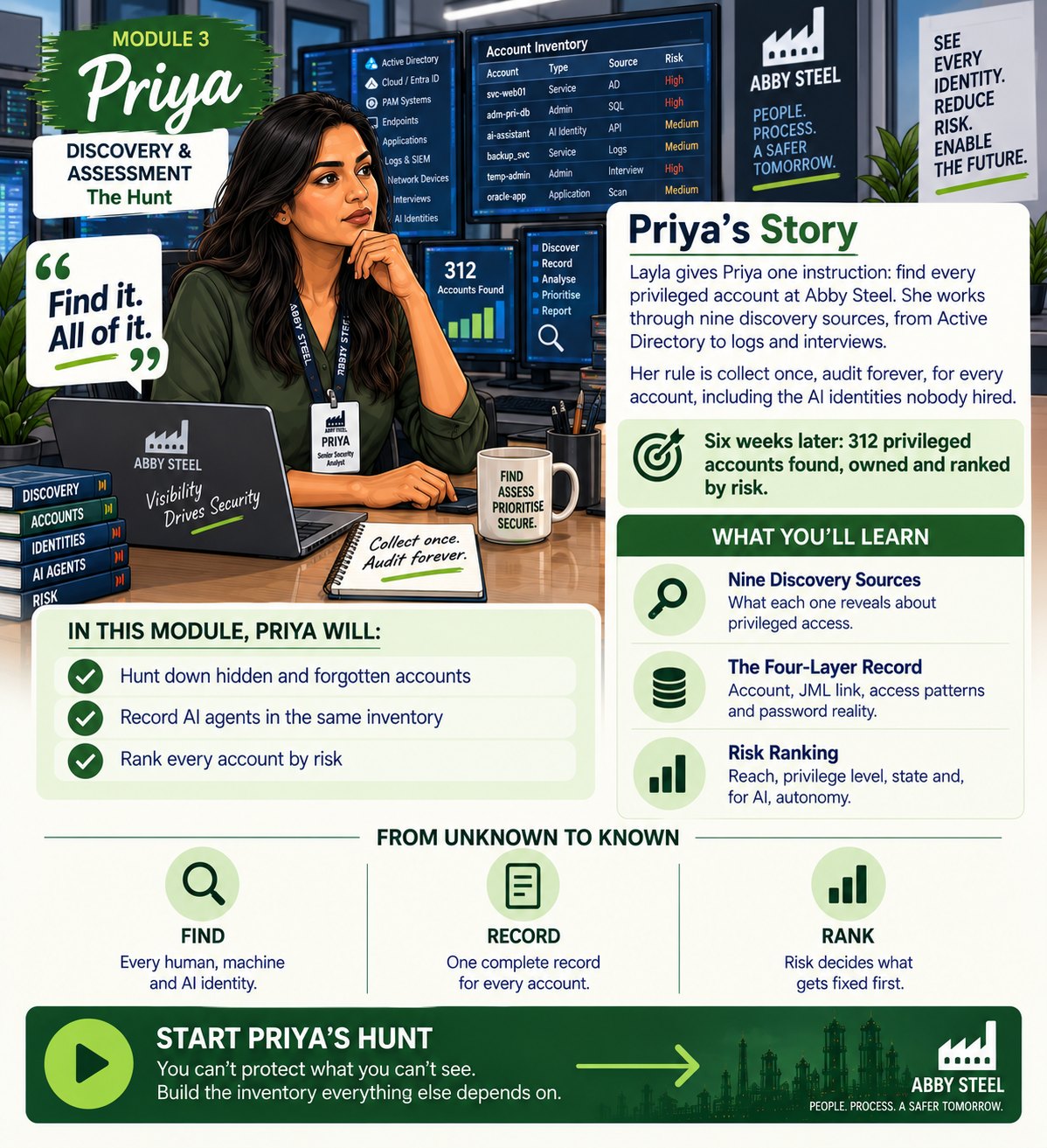
Module 3: Priya, Senior Security Analyst
Discovery & Assessment · “The Hunt”. Priya hunts down every privileged account at Abby Steel, including AI identities, records each one in full and ranks it by risk. Part of the PAM Academy, where every module follows one person through a real privileged access problem. Open Module 3 in the PAM Academy →
Who this module is for
IAM Engineer
Gets a concrete design for joiner, mover and leaver flows, including the revoke-before-grant pattern that stops privilege creep at the mover stage.
Security Architect
Learns how to structure standing, scheduled, on-demand and break-glass access tiers so least privilege survives contact with real operational work.
IT Operations Lead
Takes away a service account and rotation method built on dependency mapping, so credentials change on schedule without causing outages.
GRC and Compliance Manager
Gets a review and exception process that produces documented, defensible evidence of who approved what access, when and why.
Service Desk Lead
Understands how to handle privileged access requests, temporary grants and emergency invocations without becoming the control that everyone bypasses.
The problems this module solves
Movers accumulate privilege that nobody removes
Most organisations have a working process for joiners and a passable one for leavers, but the mover case is handled by a ticket that only adds access. Rights from the old job are never withdrawn, so after several internal moves a single person holds a combination of privileges no role ever intended. That is how one long-serving engineer ends up with twelve years of accumulated rights and a separation of duties conflict nobody planned.
Nobody owns the non-human identities
Service accounts, application accounts and appliance logins are usually the most privileged and least governed identities in the estate. They sit outside the joiner, mover and leaver process because they belong to no person, so they are never reviewed and their passwords are never changed. When the credential is embedded in a script or a code repository, one careless commit exposes the whole system it can reach.
Reviews that certify nothing
Access reviews often arrive as long exports of technical group names sent to managers with no context, no last-used data and a deadline. Reviewers approve everything to clear the queue, and the organisation records a completed certification that changed no access at all. The audit evidence looks healthy while the underlying risk is untouched.
Emergency access with no way back
Break-glass and exception access is granted under pressure, verbally approved, and rarely revisited. Temporary project access and vendor logins are meant to expire, but expiry depends on somebody remembering. The result is a layer of permanent privilege created by processes that were designed to be temporary.
What you will learn
- Discovery comes firstExplain why discovery and assessment is the foundation of a PAM programme.
- Nine discovery sourcesIdentify the nine discovery sources and what each reveals about privileged access.
- The four-layer recordCapture a complete record for every privileged account using the four layers: account and asset, JML linkage, access patterns and password reality.
- AI privileged accessRecognise AI-related privileged access, including delegated assistants, autonomous agents, integrations, embedded vendor features and shadow AI, and record it in the same inventory.
- Risk categorisationCategorise privileged accounts by risk using reach, privilege level, state and, for non-human holders, autonomy.
How do you design a joiner, mover, leaver process for privileged access?
The joiner, mover, leaver process, usually shortened to JML, is the lifecycle that governs how access is granted when someone arrives, changed when they move, and removed when they leave. Privileged access needs its own version of it. Standard JML manages the base identity, such as the mailbox and the network login. Privileged JML manages the elevation, which is a separate object with a separate owner, a separate approval and a separate expiry.
Start with the trigger. The process must fire from an authoritative record, normally the HR system for employees and a contract register for third parties, rather than from an email or a ticket. If an HR status change does not automatically create a task for the privileged account, the process is a courtesy, not a control.
Joiner
Grant a role-based baseline and nothing else. Privileged rights are not part of the starter pack; they are requested separately against a named duty. Record the named human owner at the moment of creation, along with the business justification and, where the access is temporary, an expiry date. An account that cannot name its owner on day one will not have one on day five hundred.
Mover
This is the case that most programmes get wrong. Treat a move as a leaver from the old role followed by a joiner to the new one. Revoke first, then grant, with the previous manager confirming what should be withdrawn and the new manager confirming what is genuinely required. Set a service level for withdrawal, such as five working days, and report on breaches.
Leaver
Disable privileged accounts on the last working day, terminate active sessions, reassign vault ownership and rotate every shared or service credential the leaver knew. Deletion can wait for a retention period; disablement cannot. Then measure the process: time from HR event to revocation, accounts owned by leavers, and privileged accounts with no owner at all.
What does an access review process look like when it actually works?
User access reviews, also called access certification or entitlement reviews, are the recurring check that the access people hold still matches the job they currently do. Done properly, a review surfaces over-provisioning, stale group memberships, orphaned accounts with no living owner, dormant accounts and separation of duties conflicts. Done badly, it produces a signature and nothing else.
A workable cycle has eight steps. Define and document the roles and the permissions each one requires. Map users to roles and check that nobody holds a conflicting combination. Review the roles themselves periodically to confirm the permissions are still relevant as the business changes. Audit the user assignments, with validation from the department heads who actually know what the work involves. Evaluate role granularity, because roles that are too broad over-privilege everyone while roles that are too narrow create a jungle of micro-roles nobody can maintain. Assess separation of duties, so that no single role lets one person both request and approve the same transaction. Document every change with its reason and its approver. Then repeat on a schedule set by risk and regulation, which in practice means quarterly, semi-annually or annually.
Three design choices decide whether reviewers engage. Tier the cadence by risk, so domain-wide and production administrator access is reviewed quarterly and low-risk access annually. Give reviewers decision-grade information, including plain-language descriptions, last-used dates and the account owner, rather than raw group names. And set the default for non-response to removal rather than retention, with a grace period and an appeal route.
The consequence of skipping this is documented. In 2018 an employee at SunTrust Banks reportedly accessed and stole personal data belonging to approximately one and a half million customers. No malware, no phishing. The role simply carried wide-ranging privileges and nobody had asked recently whether that was still appropriate. An insider with excessive privilege is not caught by a firewall. They are prevented by a review.
How do you implement just-in-time and least privilege access?
Least privilege means exactly the access a duty requires, nothing more and nothing less. Just-in-time access, often shortened to JIT, is how you make that practical: instead of holding administrative rights permanently, a user requests elevation for a specific task, for a specific window, with a recorded reason, and the rights disappear automatically when the window closes.
Design it from evidence rather than from job titles. Logs and monitoring data show how frequently each privileged account is used, at what times, from where and for what operations. Interviews with privileged users show how the work actually flows through a day, which is what makes JIT grants match real tasks rather than theoretical ones. Access frequency is the key signal: accounts used daily for critical operations may justify standing access with heavy monitoring, while occasional accounts should be on demand.
Structure privileged access into four tiers and aim to shrink the first one over time.
- Standing access for a small, named, closely monitored population where operational reality allows nothing else.
- Scheduled access for predictable work such as patch windows and month-end runs, activated and deactivated on a calendar.
- On-demand access requested against a task, approved by a defined approver, and expiring automatically.
- Emergency access for genuine break-glass situations, covered later in this module.
Every on-demand request should capture the requester, the target system, the task or change reference, the duration, the approver and an automatic expiry. Expiry must be enforced by the platform, not by a reminder in somebody’s calendar. Where risk is high, pair the grant with session recording and step-up authentication.
The failure mode is well illustrated by the breach at the US Office of Personnel Management, which exposed personal information for around twenty-two million individuals. It traced back to a contractor’s credentials that carried more privileges than the work required. When the contractor was compromised, the attackers inherited the excess. Standing privilege is inherited privilege.
What are the best practices for service account management?
Service accounts are the identities applications, scripts and appliances use to talk to other systems. They are frequently the most privileged accounts in the estate and the least governed, because they sit outside the human joiner, mover and leaver process. Discovery routinely finds them hiding inside user lists, on appliances that no inventory covers, and in vendor-installed software nobody has looked at since go-live.
A governance process for non-human identities has seven parts.
- Discover continuously. Scan directories, appliances, scheduled tasks, application configuration and code repositories on a schedule, so new accounts are captured on arrival.
- Assign a named owner. Every service account needs a responsible human and a backup team, recorded in the inventory. Ownership is a control, not an administrative detail.
- Record dependencies. Capture what the account is used by and what it connects to, so you know what breaks if you change it. This single field is what makes rotation safe.
- Classify by risk. Score each account by what it can reach, how privileged it is and what state it is in, then apply controls in proportion.
- Constrain the account. Remove interactive logon rights, restrict which hosts it may authenticate from, scope its permissions to the specific operations the application performs, and forbid humans from using it directly.
- Manage the credential. Move it into a vault, remove it from scripts and configuration files, and prefer platform-managed identities, group managed service accounts, certificates or key-based authentication where the application supports them.
- Decommission deliberately. When an application is retired, its accounts are retired with it, with a disable-then-delete period to catch hidden dependencies.
Two lessons make the case. In the Uber breach affecting fifty-seven million users, attackers found login credentials for cloud storage embedded in code on GitHub, held by developers whose work did not require that level of access. Closer to home, discovery at one organisation surfaced two service accounts living on an appliance nobody inventoried, found not by a scanner but in a twenty-minute conversation with the engineer who built them.
How often should privileged passwords be rotated, and how do you do it safely?
Start by recording the password reality rather than the password policy. For every privileged account, capture the actual state: age, rotation history, complexity as enforced, the authentication method in use, and whether the credential is vaulted or sitting in a script. The written standard tells you what should happen. Only the per-account state tells you what does.
Rotation frequency should follow risk and account type rather than a single organisation-wide number.
- Interactive privileged accounts managed through a vault are best rotated automatically on check-in, so each credential is used once and the user never sees or stores it.
- Service and application accounts rotate on a schedule set by risk, coordinated with the dependency record so every consumer of the credential is updated in the same operation.
- Shared and emergency accounts rotate immediately after every use, without exception.
- Event-driven rotation applies whenever a privileged user leaves, a vendor engagement ends, a suspected compromise occurs or a credential is exposed.
Rotation programmes usually stall because an unmapped dependency caused an outage, so sequence the work. Vault first and record dependencies, rotate in a test or low-risk tier, verify the application, then automate. Where an application genuinely cannot tolerate rotation, register it as an exception with a named risk owner, compensating monitoring and a review date.
Passwords are not the only credential in scope. SSH keys, API keys, certificates and tokens all need issuance, storage, rotation and revocation processes. Pair rotation with strong authentication on the human side, since multi-factor authentication on privileged accounts is what turns a stolen password into a failed login. The South Carolina Department of Revenue breach in 2012, which exposed three point six million Social Security numbers and three hundred and eighty-seven thousand credit card records, began with one phished employee and spread through elevated accounts that had no multi-factor authentication and no comprehensive privileged user list behind them.
Useful measures include the percentage of privileged credentials under vault management, the percentage rotated within policy, and the age of the oldest unrotated privileged password.
How do you build a break-glass emergency access procedure?
Break-glass access is the pre-approved route to elevated access when the normal process cannot be used, typically during a major incident, an outage of the identity platform itself, or the absence of a key approver. The aim is not to prevent emergency access. It is to make sure it is rare, visible, time-limited and fully reconstructable afterwards.
A sound procedure has the following elements:
- A small number of named accounts with defined scope, held for emergencies only and never used for routine work.
- Documented triggers stating exactly what justifies invocation, so the decision is not improvised under pressure.
- Independence from the systems it may need to fix. If the vault, the directory or single sign-on is unavailable, the emergency route must still work, which usually means a sealed offline copy of credentials held under dual control.
- Immediate alerting to the security operations team and the account owner at the moment of use, not the next morning.
- Full session capture, mandatory rotation of the credential once the session closes, and a post-use review within a defined window confirming the trigger was valid and the actions appropriate.
- Regular testing, at least quarterly, because an emergency procedure that has never been rehearsed will fail at the moment it is needed.
Exceptions need the same discipline. Temporary project access, vendor logins and emergency grants are all supposed to expire, and supposed to is a finding. Maintain an exception register in which every entry has a business justification, a named risk owner, compensating controls and a hard expiry date, and enforce expiry in the platform so the access ends on its own. Review the register at the same cadence as your access reviews.
Measure how often break-glass is invoked and by whom, how quickly each use was reviewed, and how many exceptions are past their expiry date. A rising invocation count usually means the normal process is too slow, which is a design problem rather than a behaviour to punish.
Priya’s story
Priya, a senior security analyst at Abby Steel, is handed a blunt mandate after an initial sweep: find every privileged account, all of it. Rather than repeat the industry pattern of capturing only the asset and the account name, she sets a rule before touching a single system. Collect once, audit forever. Every record captures four layers: the account and asset, the joiner, mover and leaver linkage with a named human owner, the access patterns showing when and from where the account is used, and the password reality including age, rotation history and whether the credential is vaulted or sitting in a script.
Her one-week estimate of forty-seven orphaned accounts becomes three hundred and twelve privileged accounts that appeared on no list. Service accounts on appliances. Local administrators on forgotten servers. Vendor logins from finished projects. Two surface not from a scan but from a twenty-minute conversation with an engineer who remembered building them. Because every record carries its owner, its lifecycle status and its password state, the review and rotation processes that follow have something true to run on.
Common mistakes to avoid
Treating leavers as an HR administrative task
Deactivating the mailbox is not the same as revoking privileged access, reassigning vault ownership and rotating the shared credentials the leaver knew. Drive the privileged leaver flow from the HR event, with its own checklist and its own service level.
Handling movers with grant-only tickets
If an internal move only adds the new access and never removes the old, privilege accumulates with every promotion until one person can do things no role intended. Treat a move as a revoke followed by a grant, with both the old and new manager confirming.
Running reviews that reviewers cannot understand
Sending managers raw group names with no context guarantees blanket approval and worthless evidence. Give reviewers plain descriptions, last-used dates and account owners, and make non-response result in removal rather than retention.
Rotating service account passwords without dependency mapping
One unmapped consumer of a credential turns a routine rotation into a production outage, and the organisation then abandons rotation entirely. Record what each account is used by before you change anything, and rotate in tiers.
Building emergency access and never testing it
A break-glass procedure that depends on the identity platform being available, or that nobody has rehearsed, fails exactly when it is needed. Keep the emergency route independent, test it at least quarterly and rotate the credential after every use.
Key takeaways
- Privileged access needs its own joiner, mover and leaver flow, triggered by the HR record and measured by time to revoke.
- The mover case is where privilege creep is born: always revoke before you grant.
- Just-in-time access should be designed from log evidence and real workflows, with expiry enforced by the platform rather than by memory.
- Every service account needs a named owner and a dependency record, because ownership makes review possible and dependencies make rotation safe.
- Emergency and exception access must be pre-approved, alerted, recorded, rotated after use and reviewed on a schedule.
Frequently asked questions
What is a joiner mover leaver process in PAM?
Joiner, mover, leaver is the access lifecycle that governs what happens when someone joins the organisation, changes role and leaves. In privileged access management it is applied separately from the standard identity lifecycle, because elevation is a distinct object with its own owner, justification, approval and expiry. The process should be triggered automatically by an authoritative source such as the HR system, grant only role-based baseline access to joiners, revoke before granting for movers, and disable privileged accounts, terminate sessions and rotate shared credentials on a leaver’s last working day.
How often should privileged access reviews be carried out?
Set the cadence by risk rather than applying one interval to everything. High-risk access such as domain-wide administration, production systems, financial systems and customer data is commonly reviewed quarterly. Medium-risk access is reviewed every six months and low-risk access annually. Regulatory obligations may set a minimum, so check the frameworks that apply to you. Whatever the interval, the review is only useful if reviewers get plain-language descriptions and last-used data, if department heads validate the assignments, and if every decision is documented with its reason and approver.
What is just-in-time privileged access and how is it different from standing access?
Just-in-time access grants elevated rights for a specific task, for a limited period, against a recorded reason, and removes them automatically when the window expires. Standing access means the rights are held permanently, whether they are in use or not. The difference matters because an attacker who compromises an account inherits whatever that account holds at that moment. With just-in-time access the window of useful privilege is minutes or hours instead of years. Start by using access frequency data to identify which accounts need standing rights at all, then move the rest to scheduled or on-demand grants.
How do you rotate service account passwords without breaking applications?
The failures come from unmapped dependencies, so build the dependency record first. For every service account, capture which applications, scripts, scheduled tasks and appliances use the credential and what they connect to. Then vault the credential, remove hard-coded copies from scripts and configuration, and rotate in tiers, starting with test and low-risk systems and verifying the application after each change before automating. Where an application genuinely cannot support rotation, log it as a formal exception with a named risk owner, compensating monitoring and a review date. Where the platform supports managed identities or certificate-based authentication, use them and remove the password problem entirely.
What should a break-glass emergency access procedure include?
It should include a small number of pre-approved emergency accounts with defined scope, documented triggers stating when invocation is justified, and an access route that does not depend on the systems it might have to repair. Use dual control over sealed credentials, alert the security operations team and the account owner the moment the account is used, record the full session, rotate the credential immediately afterwards and complete a documented review within a set window. Test the procedure at least quarterly. Track how often it is invoked, because frequent use usually means the normal request process is too slow to be usable.
Start Module 3 in the PAM Portal
Work through Priya’s module in full, with the walkthroughs, templates and assessment that turn this into something you can apply on Monday morning.
Open Module 3 in the PAM Portal
Vendor-neutral. Built by practitioners. Designed around the roles that do the work.